



Here’s a situation I’ve run into more times than I’d like to admit. You build an agent. You give it a couple of tools, wire up a nice prompt, and ask it a question. It thinks for a moment, calls the right tool, comes back with a beautiful answer, and you sit there feeling like a genius. You demo it to a friend. It works again. Ship it.
And then, a week later, someone asks it a slightly different question and it confidently calls the wrong tool, loops three times, burns a small fortune in tokens, and hands back an answer that is subtly, dangerously wrong. Nobody notices for a while. That is the part that feels wrong.
The uncomfortable truth is that a demo is not evidence. It’s an anecdote. And when you’re building agents, anecdotes are cheap and misleading. So the real question I want to tackle in this post is this: how do you actually know your agent works? Not “did it work that one time I tried it”, but “does it work, reliably, across the messy space of inputs the real world is going to throw at it?”
The answer is evals, and evaluating agents turns out to be a genuinely different beast from evaluating a plain model. Let me walk you through it, layer by layer, and by the end we’ll build a small agent and evaluate it end to end so the ideas actually stick.
Why this is harder than it looks
If you’ve done any machine learning, “evaluation” probably sounds like a solved problem. You have a test set, you have labels, you compute accuracy. Done.
Agents break that comfortable picture in two ways.
Agents are non-deterministic. Run the same prompt twice and you can get two different answers, two different tool calls, two different paths to the goal. There often isn’t one “correct” string to compare against.
Agents are multi-step. A plain LLM call is one input and one output. An agent plans, calls a tool, looks at the result, reasons again, maybe calls another tool, and eventually answers. Every one of those steps is a place where things can go wrong, and errors compound. A small mistake in step one can quietly poison every step after it.
So a single “did it give the right answer?” check is nowhere near enough. You need to evaluate the whole behaviour of the system, not just its last sentence.
Why agent eval isn’t model eval
Here’s the mental shift that makes everything else click.
When you evaluate a plain LLM, you’re scoring a single input → output pair. When you evaluate an agent, you’re scoring a trajectory: the entire sequence of thoughts, tool calls, observations, and reasoning steps that leads from the user’s question to the final answer.
That means there are really two things worth judging:
The destination: Is the final answer correct, relevant, and grounded?
The journey: Did it pick the right tools, call them with the right arguments, in a sensible order, without wasteful loops or hallucinated steps?
An agent can absolutely land on the right answer for the wrong reasons; guessing, or getting lucky after three bad tool calls. If you only grade the destination, you’ll never catch that, and it will bite you later.
Here’s where evals hook into the agent loop:

Notice that the loop between the LLM and the tools can run many times. Every trip around that loop is a fresh opportunity for the agent to go off the rails — and a fresh place you might want to attach an eval.
A taxonomy of agent evals
Before we talk metrics, it helps to have a map. When people say “evals” they’re often talking about very different things, and conflating them is a recipe for confusion. I find it useful to slice the space along three axes.
Component vs end-to-end. A component eval unit-tests a single piece — one tool, one prompt, one reasoning step — in isolation. An end-to-end eval runs the whole agent on a task and judges the overall outcome. You want both: components catch where something broke, end-to-end catches whether the thing works at all.
Offline vs online. Offline evals run against a curated dataset, usually in CI, before you ship. Online evals run against real production traffic after you ship, sampling live interactions to catch drift and surprises the dataset never anticipated.
Capability vs safety. Capability evals ask “is it good?” — is it accurate, helpful, efficient? Safety evals ask “is it safe?” — is it grounded, non-toxic, resistant to prompt injection, and does it stay in its lane?

A mature setup doesn’t pick one branch; it borrows from all three. But you don’t have to build all of it on day one, and I’d argue you shouldn’t.
Metrics that matter
Okay, so we know we want to judge both the journey and the destination, across a few different axes. But how do you turn something as fuzzy as “was this a good answer?” into a number?
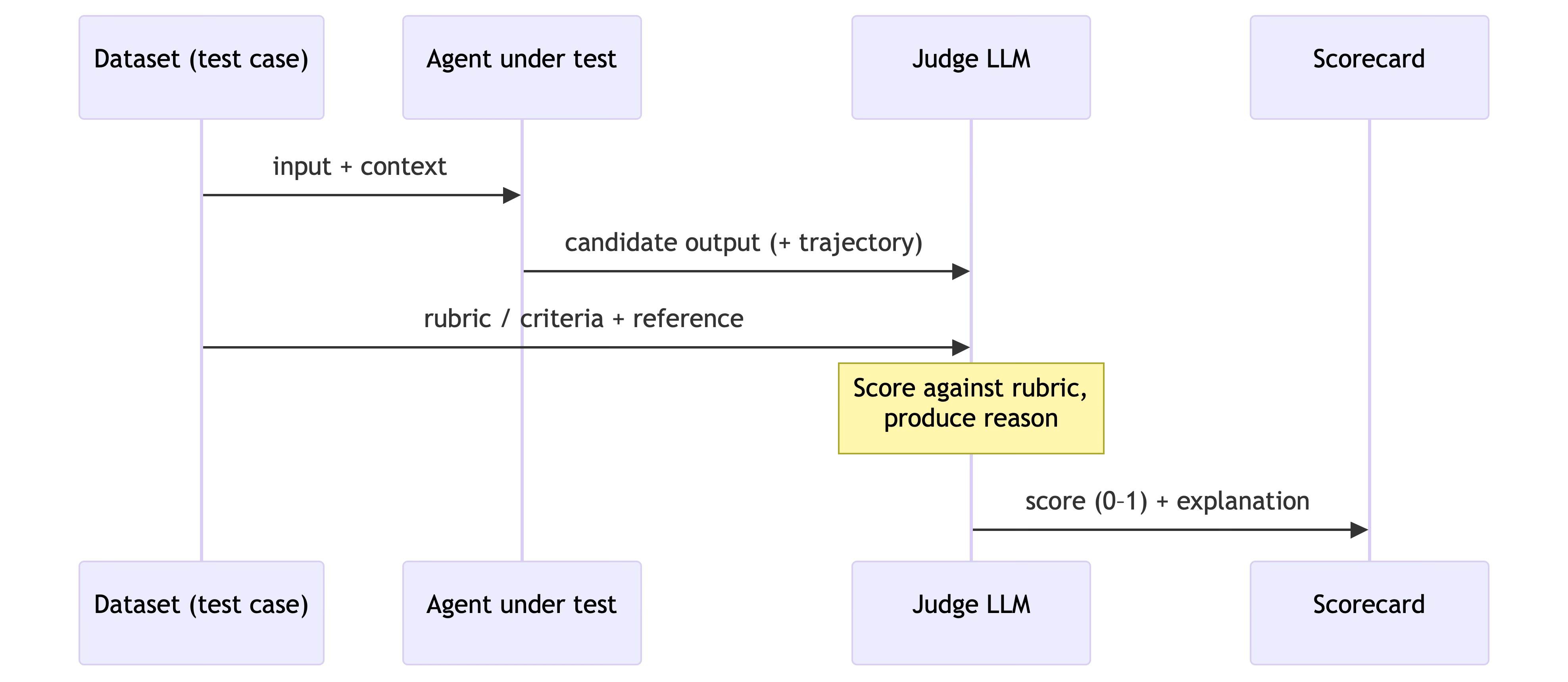
This is where things get interesting, because a lot of agent metrics are themselves powered by an LLM. The pattern is called LLM-as-judge: you take the agent’s output, hand it to a second model along with a rubric, and ask that judge model to score it and explain why. It sounds circular (using an LLM to grade an LLM) but in practice, judging an answer is a much easier task than producing one, and a well-prompted judge correlates surprisingly well with human graders.
Here’s how a single LLM-as-judge evaluation actually flows:
The key metrics I reach for when evaluating an agent, and what each one is really there to catch:
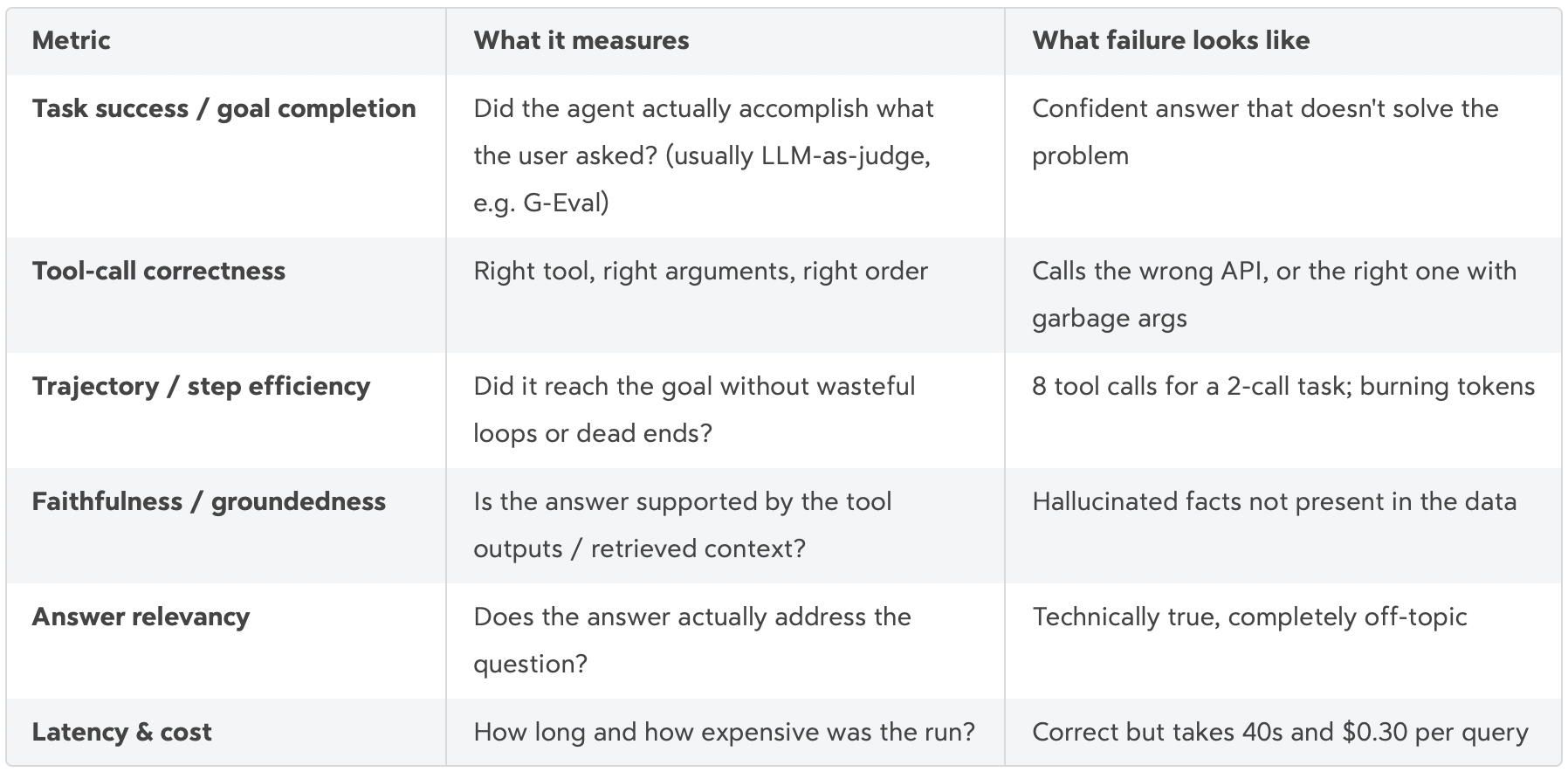
Two things I want to stress here. First, latency and cost are real metrics, not afterthoughts; an agent that’s right but unusably slow or expensive is a failed agent. Second, no single metric is enough. Task success without tool-call correctness means you’re one unlucky roll away from breaking; tool-call correctness without faithfulness means the plumbing is right but the answer is made up. You need a basket of metrics that, together, describe what “good” means for your specific agent.
Datasets and golden sets: what you measure against
Metrics need something to measure against, and that something is your dataset — often called a golden set or golden dataset. This is the single highest-leverage artifact in your whole eval setup, and it’s the part people most love to skip.
A good golden set for an agent isn’t just a list of questions. Each case ideally captures:
the input (the user query, plus any relevant context),
the expected tools — which tools should be called, and ideally in what order (this is what lets you score the journey), and
a reference answer — not necessarily the exact string, but a ground truth the judge can compare against.
You can build these two ways, and you’ll usually do both. Hand-curated cases are the ones you write yourself: the tricky inputs, the known edge cases, the bug that bit you last month turned into a permanent regression test. Synthetic cases are generated (often by an LLM) to cover breadth cheaply. My advice: keep the set small but representative to start. Twenty carefully chosen cases that span your real usage will teach you more than a thousand random ones, and they’ll actually run fast enough that you’ll bother to run them.
With the concepts in place, let’s move out from theory and actually build something.
Hands-on: building the agent, then evaluating it
Let’s build a tiny agent, then wrap evals around it. I’ve put the full, runnable code in my python-frameworks repo under ai/evals/ — here I’ll show the parts that matter.
Our subject is a customer-support triage agent with exactly two tools: a knowledge-base search and a subscription lookup. The critical design choice is that a run returns more than a string. It returns the answer and the trajectory:
@dataclass
class AgentResult:
    answer: str
    trajectory: list[dict]          # every tool call: name, input, output
    retrieval_context: list[str]    # KB docs the answer should be grounded in
That trajectory and retrieval_context are what let us grade the journey, not just the destination. If your agent only hands back a final string, you’ve thrown away most of what you need to evaluate it. Instrument for evals from the start.
The golden set
Four hand-curated cases — a policy question, an account lookup, one that needs both tools, and an unknown-account edge case. Each one declares the tools it expects:
GOLDEN_DATASET = [
    {
        "input": "I'm on account A-2002 — am I eligible for a refund?",
        "expected_tools": ["get_subscription", "search_knowledge_base"],
        "reference_answer": "Account A-2002 is on a monthly plan, which is "
                            "non-refundable, though it can be cancelled anytime.",
    },
    # ... three more
]
The metric basket
Remember: no single metric is enough. We assemble the basket from Layer 4 — task success (an LLM-as-judge GEval), tool correctness, faithfulness, and answer relevancy:
task_success = GEval(
    name="Task Success",
    criteria="Does the output accomplish the user's request and match the "
             "expected output? Penalise confidently-wrong answers.",
    evaluation_params=[INPUT, ACTUAL_OUTPUT, EXPECTED_OUTPUT],
    threshold=0.7,
)
tool_correctness = ToolCorrectnessMetric(threshold=0.9)
faithfulness     = FaithfulnessMetric(threshold=0.8)
answer_relevancy = AnswerRelevancyMetric(threshold=0.7)
One test case first
Start with a single case so you can see the shape of it. We run the agent, then pack the result into DeepEval’s LLMTestCase — mapping the trajectory onto tools_called and the golden expected_tools:
result = run_agent("I'm on account A-2002 — am I eligible for a refund?")

test_case = LLMTestCase(
    input=case["input"],
    actual_output=result.answer,
    expected_output=case["reference_answer"],
    retrieval_context=result.retrieval_context,
    tools_called=[ToolCall(name=s["tool"]) for s in result.trajectory],
    expected_tools=[ToolCall(name=n) for n in case["expected_tools"]],
)
assert_test(test_case, [task_success, tool_correctness, faithfulness, answer_relevancy])
Run just that one from the CLI:
deepeval test run ai/evals/test_agent_evals.py -k "refund" Here’s the subtle thing this catches: suppose the agent skips get_subscription, assumes the customer is on an annual plan, and cheerfully offers a refund. The final answer might even read plausibly — but ToolCorrectnessMetric sees the missing tool call and FaithfulnessMetric sees a claim with no supporting context. Two independent metrics flag the same underlying failure. That redundancy is a feature, not waste.
Then the whole suite
Scale the single case to the whole golden set with parametrize, and you have a regression suite:
@pytest.mark.parametrize("case", GOLDEN_DATASET, ids=[c["input"][:24] for c in GOLDEN_DATASET])
def test_agent(case):
    test_case = build_test_case(case)
    assert_test(test_case, metrics_for(test_case))
For a scorecard view instead of pass/fail assertions, run_evals.py pipes the same cases through DeepEval’s evaluate(). One quirk worth calling out: faithfulness only makes sense when there’s retrieved context to be faithful to. For account-only questions the agent never searches the KB, so I only attach that metric to grounded runs rather than forcing it everywhere. Little decisions like that are the difference between evals you trust and evals that cry wolf.
From offline to online: closing the loop
Everything so far is offline evaluation — a curated golden set you run before shipping. That’s necessary, but it’s not sufficient. Your golden set only knows about the failures you already thought of. Production will invent new ones.
So a mature setup runs two loops:
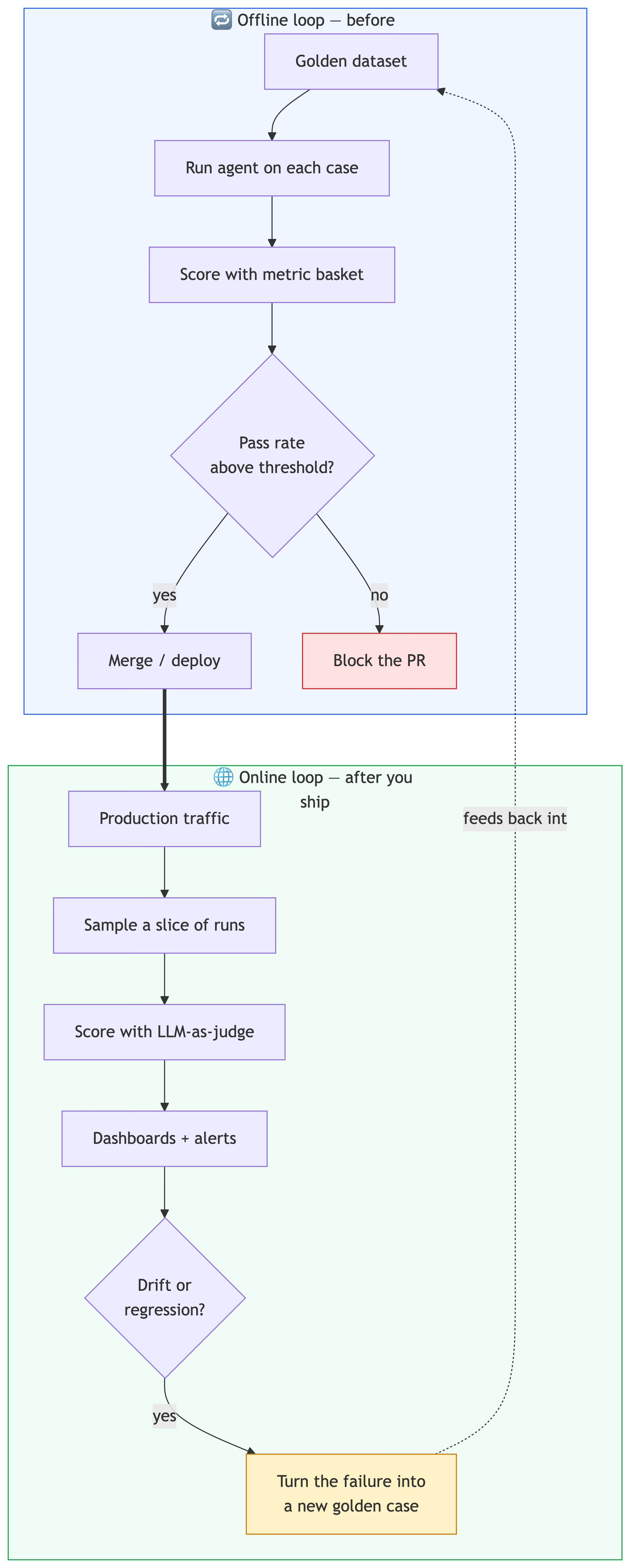
The offline loop is your CI gate: the golden-set evals run on every pull request, and the build fails if the pass rate drops. The online loop samples real interactions, scores them with the same LLM-as-judge metrics, and surfaces drift on a dashboard. And here’s the part that makes the whole thing compound: every production failure you catch becomes a new golden case, feeding back into the offline set so the same bug can never sneak past CI again. Your eval suite gets smarter every time production surprises you.
Pitfalls and gotchas
Evals are powerful, but they have sharp edges. A few I’ve learned to respect:
The judge is itself a fallible model. LLM-as-judge has bias and variance — it can favour longer answers, or score the same output differently across runs. Pin the judge model, use clear rubrics, and spot-check it against human judgement now and then.
Don’t optimise a single number. The moment a metric becomes a target, you’ll start gaming it (Goodhart’s law, alive and well). That’s exactly why we use a basket — it’s much harder to game four metrics at once.
Beware over-fitting to the golden set. If you only ever test the same 20 cases, you’ll build an agent that’s great at those 20 cases. Rotate in fresh cases from production regularly.
LLM-as-judge costs real money and time. Every eval run is a pile of extra model calls. Keep the golden set small and sharp, and don’t run the expensive judge on every keystroke.
Embrace non-determinism — use thresholds, not exact matches. Asserting output == "expected string" will give you flaky, infuriating tests. Score with thresholds (>= 0.7) so the suite tolerates the natural variance of a probabilistic system.
Wrapping up
If there’s one idea I want to leave you with, it’s the old one: you can’t improve what you can’t measure. Agents are non-deterministic, multi-step, and quietly fragile, and a good demo tells you almost nothing about whether they’ll hold up. Evals are how you replace “it worked when I tried it” with actual, defensible confidence by judging both the destination and the journey, offline and online.
Start small. Instrument your agent to return its trajectory. Write ten golden cases. Wrap a basket of metrics around them. Wire it into CI. That alone will put you ahead of most agents shipping today.
Next up, I want to go one layer deeper into observability and tracing how to actually see inside a running agent so that when an eval fails, you know exactly which step to blame. If that sounds useful, subscribe to the compute blog using the button below so you don’t miss it.
Thank you so much for reading, and I’ll see you in the next one. Have a wonderful day!