



Welcome to the Agentic Era
Hello, and welcome to the deep end of the AI pool. If you are reading this, you are likely a software engineer who has moved past the “honeymoon phase” of Generative AI. You have played with chat prompts, maybe built a simple RAG (Retrieval-Augmented Generation) application using a few API calls, and now you are hitting a wall. The wall is determinism. You need your application to do more than just talk; you need it to act, adhere to business logic, and scale without hallucinating its way into a production incident.
Welcome to Agent Engineering.
This post is designed as a comprehensive, developer-to-developer tutorial on Google’s Agent Development Kit (ADK). We are going to move beyond simple scripts and build robust, production-ready multi-agent systems. The ADK is not just another wrapper around an LLM API; it is an opinionated framework designed to bring software engineering discipline—modularity, type safety, observability—to the probabilistic world of AI. This post has code that I’ve implemented on Github for you to run at your end.
Why ADK? The Code-First Philosophy
In the current landscape, you have options. You could use LangChain, which is fantastic for its breadth of integrations but can become “glue code hell” in production. You could use Firebase Genkit, which is excellent for adding AI features to full-stack apps but is less specialized for complex, autonomous agent hierarchies.
The ADK is different. It is built for complex multi-agent orchestration. It treats agents not just as prompts, but as software components with defined inputs, outputs, and state lifecycles. It allows you to define “How does this agent think?” separately from “What tools can this agent use?” and “Who does this agent talk to?”.

The ADK shines when you need predictability. By using primitives like SequentialAgent, ParallelAgent, and strict FunctionTool definitions, you constrain the LLM’s vast creative potential into a useful, reliable laser beam of utility.
Key capabilities
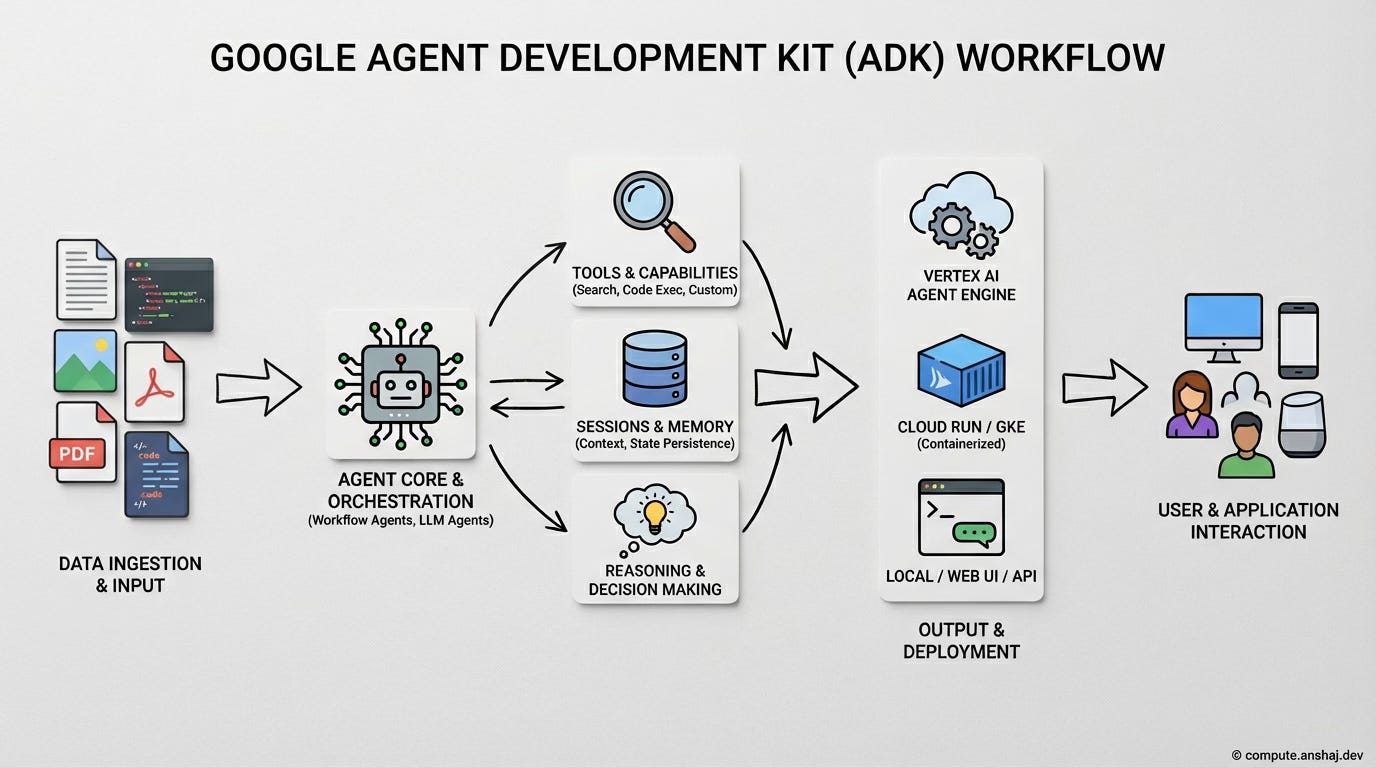
Agent Orchestration
You can structure complex agent behaviors using explicit controls like sequential, parallel, or looping workflows rather than relying solely on prompts. It enables hierarchical delegation, where a Manager agent can route specific sub-tasks to specialized Worker agents and synthesize their outputs. This combination of deterministic code structures and probabilistic LLM routing creates stable, multi-agent systems.
Web UI
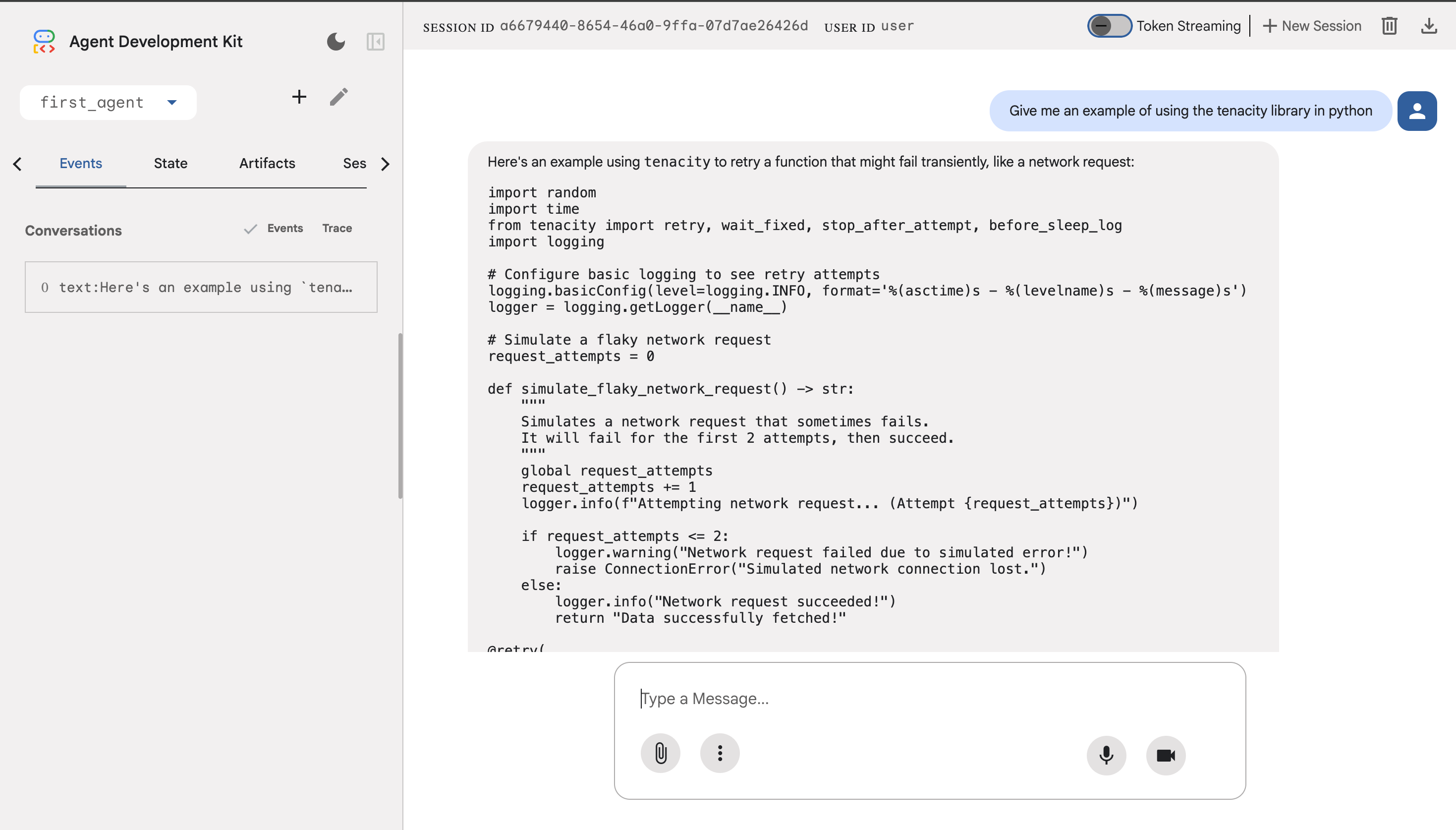
The kit includes a local developer dashboard, often called ADK Web, which lets you chat with your agent and visually inspect its reasoning process in real-time. It provides a graphical trace of every step—from user input to specific tool calls—making it significantly easier to debug logic errors than reading raw logs. Newer features also support visual, drag-and-drop construction of agent workflows to speed up prototyping.
Tools & Capabilities
ADK supports the Model Context Protocol (MCP), enabling plug-and-play connections to external data sources like SQL databases or Slack without writing custom glue code. It also implements the Agent-to-Agent (A2A) protocol, allowing your ADK agents to communicate and negotiate tasks with agents built on completely different frameworks. Out of the box, it includes essential tools for grounded Google Search and sandboxed code execution.
API Server & Runtime
ADK allows you to deploy agents directly into the Vertex AI Agent Engine or as a standalone service, automatically exposing them as scalable, production-grade API endpoints. It supports standard frameworks like FastAPI for custom implementations while managing the complex, asynchronous request/response lifecycle. This setup handles long-running agent reasoning seamlessly without timing out connections or blocking the main thread.
Sessions & Memory
ADK treats memory as infrastructure, distinctly separating temporary conversation context from persistent user state and preferences. It integrates with Vector DBs to create a Memory Bank, allowing agents to programmatically save and semantically retrieve information across different sessions. This enables true long-term recall, allowing the agent to “remember” details from weeks ago rather than just the current chat window.
Ease of Deployment
ADK follows a “Code Local, Deploy Global” philosophy, ensuring that agents are container-ready and can be deployed to Vertex AI or Cloud Run with a single CLI command. You can also deploy an ADK server on any other cloud provider or on-prem depending on your needs.
Prerequisites and Setup
Before we write a single line of code, let’s get our environment ready. The ADK is a modern Python framework, and it demands modern tooling.
Hard Requirement: You must use Python 3.10 or higher. The ADK leverages advanced typing features available in newer Python versions, and trying to run this on Python 3.9 will result in immediate breaking errors.
I recommend using uv (a fast Python package manager) or standard venv.
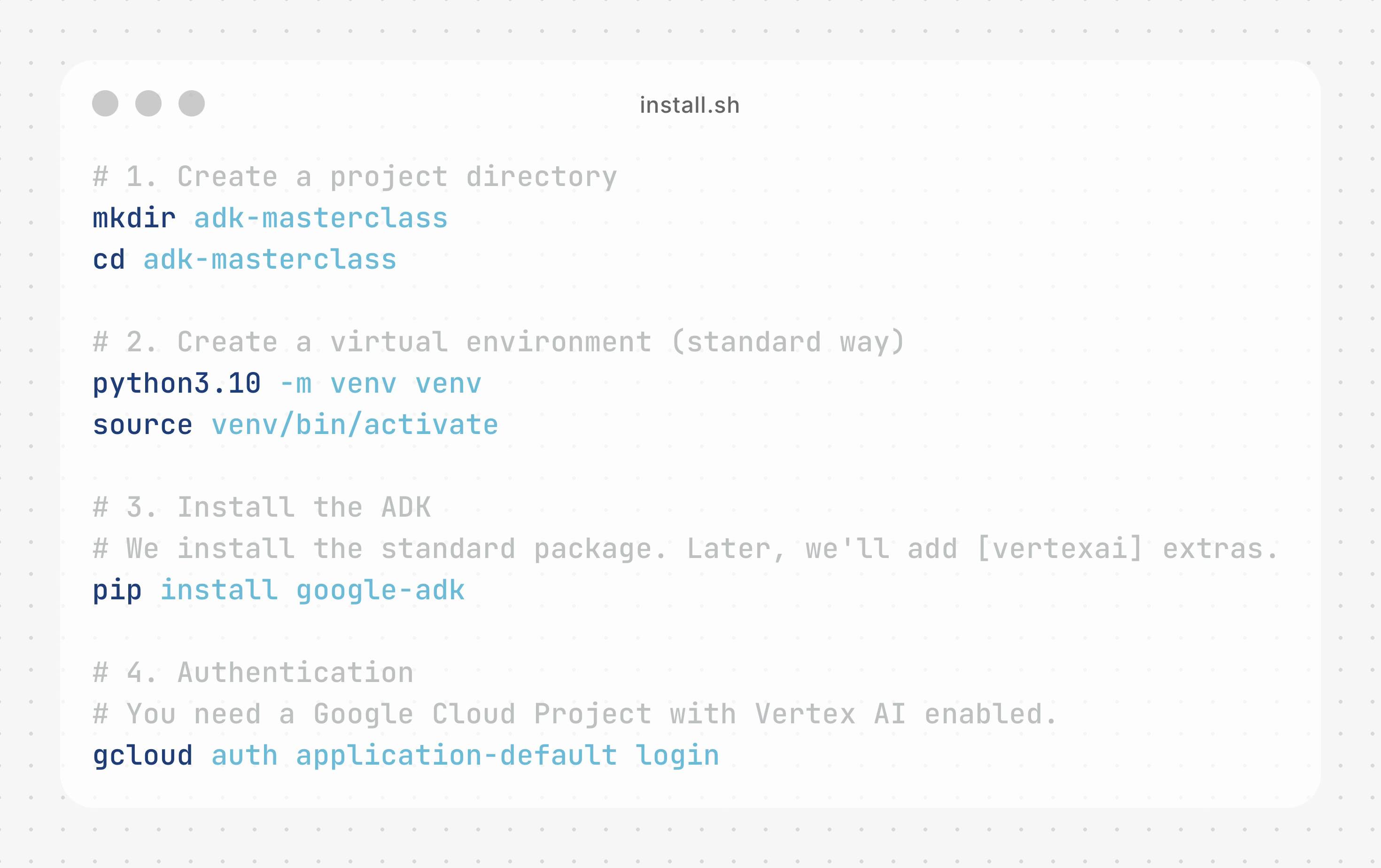
Once installed, the ADK gives you a CLI tool (adk) that we will use later for deployment and local testing. But first, let’s understand the atoms that make up the universe.
The Atom of Intelligence: The Agent Class
In the ADK, an Agent is the fundamental unit of execution. It is not just a prompt; it is a container that holds:
Model Configuration: Which brain are we using? (e.g., Gemini 2.5 Flash).
Instruction (System Prompt): The personality and constraints.
Tools: The capabilities (functions, APIs).
Internal State: Context management.
Let’s build a “Hello World” agent, but let’s make it robust. We will use the Agent class to create a helpful coding assistant.
Your First Agent
Create a file named agent.py. This is the convention ADK expects for deployment later. Create this file
parent_folder/
    first_agent/
        __init__.py
        agent.py
        .env
Now write the following code in agent.py. You can find the code implementation in a Github Codespace here for easier access and experimentation at your end.
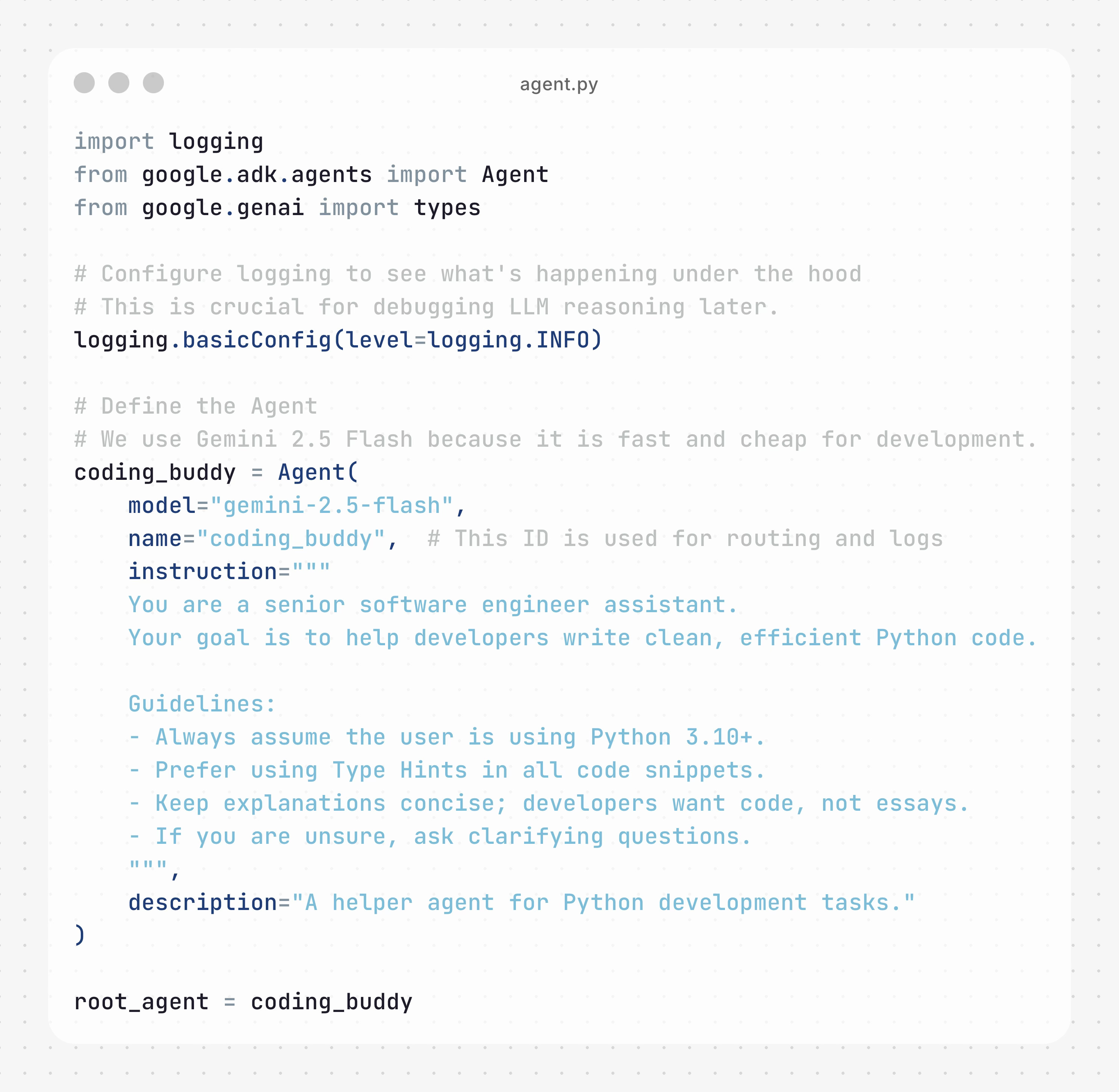
Deconstructing the Code:
model: We specify the model ID string. ADK abstracts the API calls to Vertex AI or Google AI Studio.
name: This isn’t just a label. In a multi-agent system, if a Manager agent wants to ask the Coding Buddy for help, it uses this name to route the request.
instruction: This is your System Prompt. Notice the specific guidelines. In Agent Engineering, being prescriptive here is better than hoping the model figures it out.
We’ll need 2 more files apart from this
__init__.py is an empty file that the ADK requires
.env file is used to store your Gemini API Key, which can be created google AI studio. You can use a free Gemini API key for this example.
Ensure that your .env file contains the newly created Gemini API Key
echo ‘GOOGLE_API_KEY=”YOUR_API_KEY”’ > .envIf you’re getting an error stating that you’ve reached the end of free quota, it’s likely that your key isn’t getting picked up automatically and you should export the key to your shell with
export GOOGLE_API_KEY=”YOUR_API_KEY”Once you’re ready, navigate to your parent folder and run the following command on your terminal.
adk webAnd you’ll get the following screen. You can find the code shown in this example in my Github repository here and if you’d like you can even use Github Codespaces to spin it up without having to set up anything on your own computer.
Let’s dive deeper and build more complex use-cases.
