
Microsoft Agent Framework
Building Production-Ready AI Agents in Python


The AI landscape has shifted from single-model prompting to multi-agent orchestration systems where multiple specialized AI agents collaborate, reason, and act autonomously. Microsoft’s answer to this shift is the Microsoft Agent Framework, a unified, open-source SDK that merges the experimental power of AutoGen with the enterprise backbone of Semantic Kernel into one production-ready toolkit.
In this article, we’ll explore what the Agent Framework offers, why it matters, and how to build multi-agent systems in Python.
What Is the Microsoft Agent Framework?
The Microsoft Agent Framework is an open-source SDK and runtime for building, orchestrating, and governing multi-agent AI systems. It reached General Availability (v1.0) in April 2026 and supports both .NET and Python. Its a very nice framework that feels very developer friendly. And even if you do not have significant python experience, you’re going to find the API very clean to read and implement. I ran quite a lot of experiments with this framework and here is what I think you should know about it.
Key Features
Here are some key features of this framework
Multi agent orchestration: The framework supports multiple orchestration patterns out of the box:
Sequential: Agents execute one after another in a defined order
Concurrent: Agents run in parallel, results are merged
Group/Dynamic: Agents collaborate dynamically based on context
Graph-based: Features include explicit directed graphs with branching, checkpointing, and human-in-the-loop
Open Standards & Interoperability
Model Context Protocol (MCP): Dynamic runtime tool and API discovery
Agent-to-Agent (A2A): Cross-runtime, cross-platform agent communication
OpenAPI connectors: Rapidly connect external REST APIs, Microsoft 365, Graph, and more
Production Readiness
Observability is available through native open telemetry support
Allows for durable and persistent long-running workflows which are often necessary for complex use-cases
Security is available at multiple layers with human in the loop approvals and checkpoints, also easily implementable through the framework
Developer experience is actually quite nice
Fluent APIs - You can create agents in a few lines of code that will get the job done. In practice it feels very similar to ADK from Google or the strands framework from AWS
Config based definition for the agents
You can easily plug memory to the agents too (Redis, Pinecone, Azure AI Search etc.)
Getting Started
Installation
pip install agent-frameworkFor a lighter install with just the core:
pip install agent-framework-coreThe Agent API
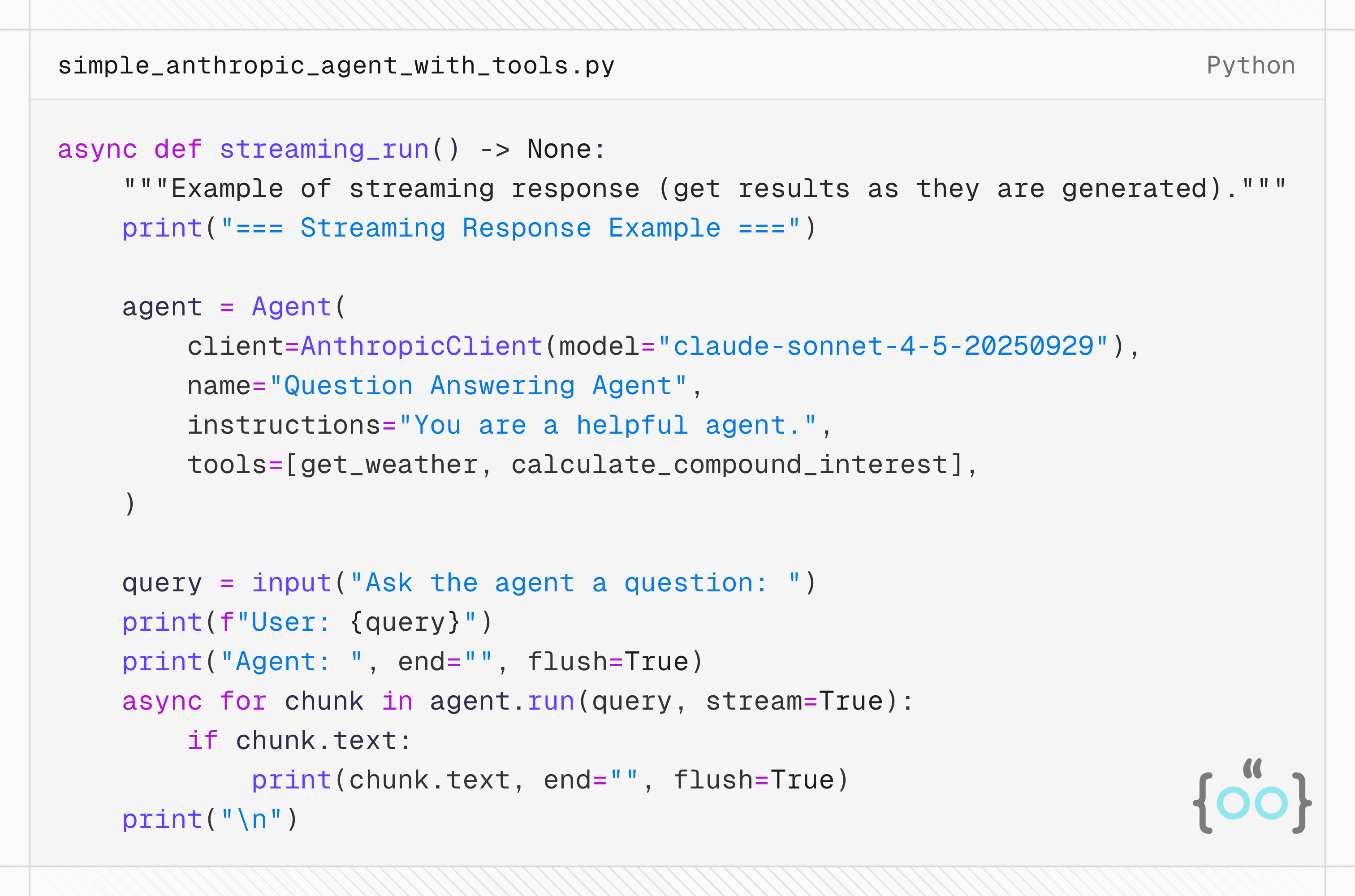
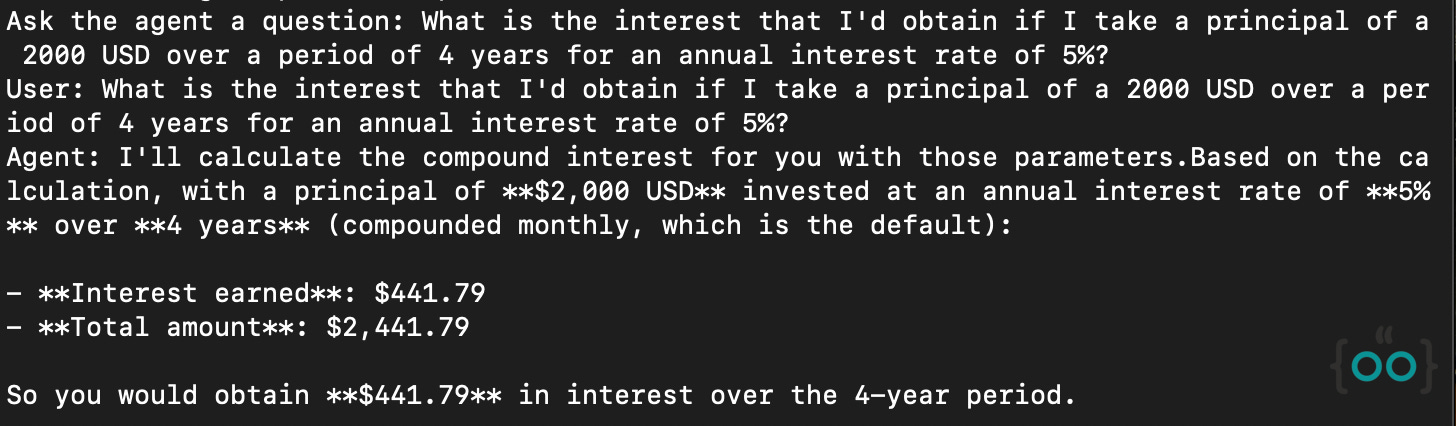
I built my first agent using Anthropic’s Claude Sonnet 4.5 and with 2 simple tools that I generally use to while creating a new Agent in any framework. You can see that the client implementation is neat and very straight forward. Streaming is supported out of the box as well, which is nice to see.
Workflows
A workflow, is a predefined sequence of operations that can include AI agents as components. Workflows are designed to handle complex business processes that may involve multiple agents, human interactions, and integrations with external systems. The flow of a workflow is explicitly defined, allowing for more control over the execution path.
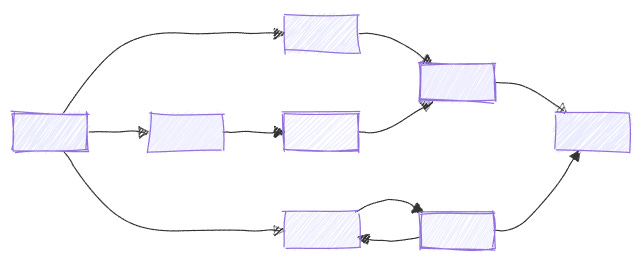
Some of the key features of the workflows include type safety, flexible and intelligent control flow and checkpointing.
Microsoft Agent Framework offers two complementary APIs for building workflows:
Functional Workflow API : Write workflows as plain async functions using decorators. Use native Python control flow instead of graph concepts. A good starting point before adopting the graph API.
Workflow Builder & Execution: Build workflows as directed graphs using Workflow Builder, executor and edges. Best for fixed topologies with type-validated message routing and superstep-based parallel execution.
Both APIs are fully supported and produce the same observable results (events, streaming, HITL, checkpoints). Choose based on what fits your workflow best.
One of the interesting things about this framework is that you can create workflows without agents (100% deterministic) involving no LLM use, and you can also create workflows involving multiple agents (LLMs with tools) and a functional/graph structure to guide the flow of execution.
I think workflows are quite honestly a great tool for a lot many Agentic use-cases for corporates primarily because they combine the power of agent intelligence with the structure associated with human-crafted workflows. It’s a very nice solution to create a balance between determinism and probabilistic behavior of LLM agents.
Let me show you how this can looks like. The video below is a fully deterministic workflow that classifies emails as Spam or not, with a human-in-the loop approval process. It has an email preprocessor, spam detector, spam handler processes. Oh and the dev UI that you’re seeing below is what the framework ships with, to allow one to well… visualize flows.
Now, that you’ve seen a deterministic workflow, let me show you how a workflow with Agents can look like. In the video below, what I have is a use-case showcasing the entire writing ecosystem comprising of 5 different agents talking to each other depending upon the confidence score determined and exchanged within agents.
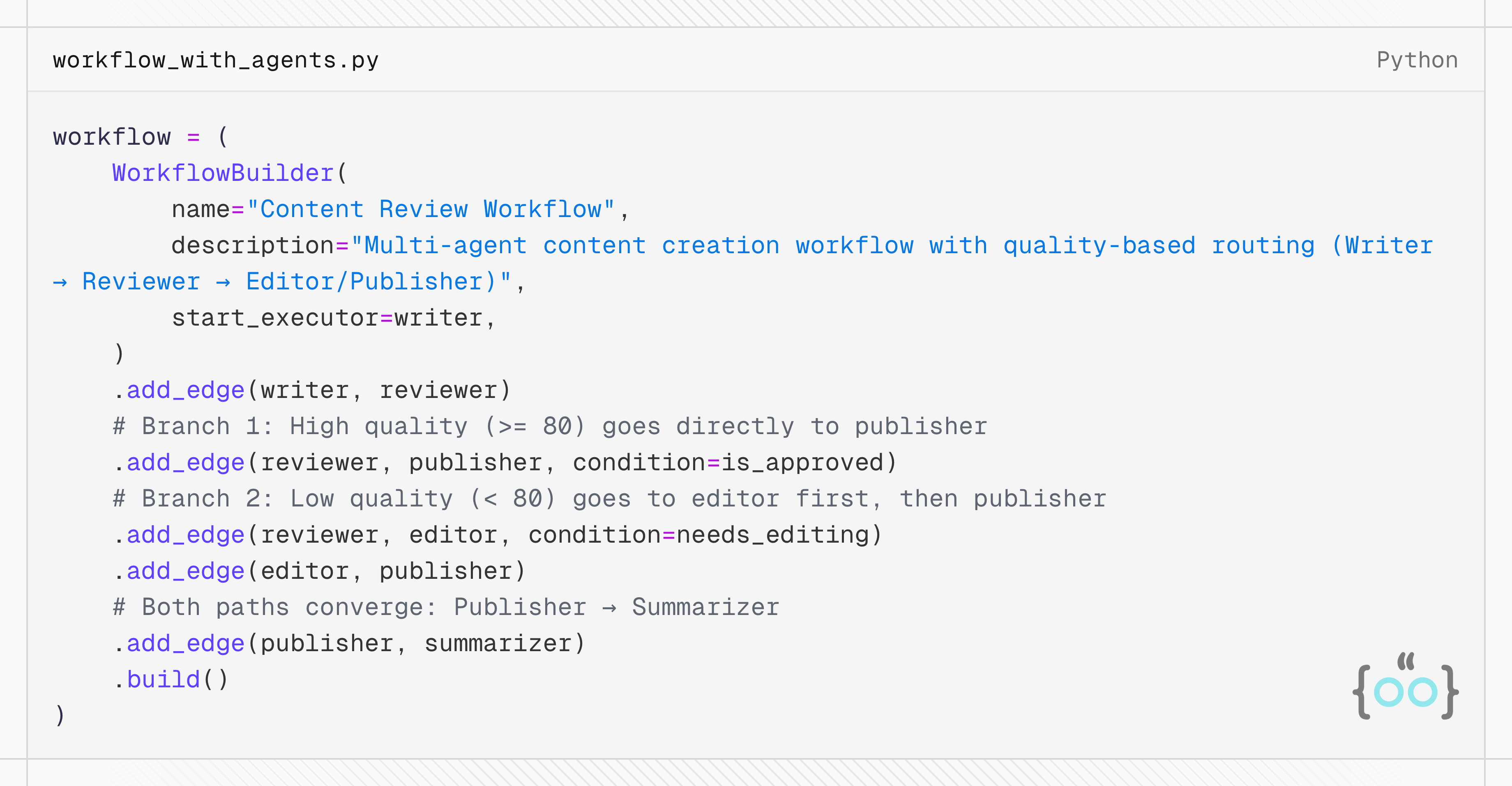
The beauty of this implementation actually lies in how these agents are orchestrated within the workflow. Here’s the piece of code that is making all of the magic happen. You can see that the editor agent doesn’t kick-in until the quality score drops below 80. Many complex business use cases work in a very similar nature and it is nice to see how easily this framework supports the same.
The framework supports orchestrating agents in various ways, depending on your use-case.
Sequential: Agents execute one after another in a defined order
Concurrent: Agents execute in parallel
Handoff: Agents transfer control to each other based on context
Group Chat: Agents collaborate in a shared conversation
Magentic: A manager agent dynamically coordinates specialized agents
I’ve added a bit more info about these below.
Sequential
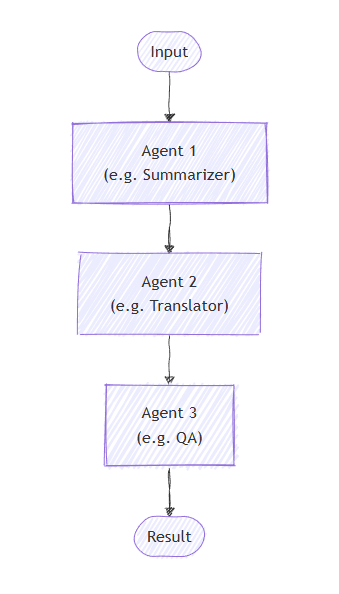
In sequential orchestration, agents are organized in a pipeline. Each agent processes the task in turn, passing its output to the next agent in the sequence. This is ideal for workflows where each step builds upon the previous one, such as document review, data processing pipelines, or multi-stage reasoning.
Concurrent
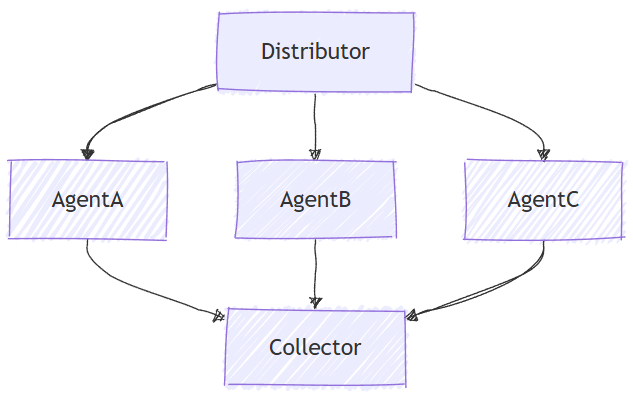
Concurrent orchestration enables multiple agents to work on the same task in parallel. Each agent processes the input independently, and their results are collected and aggregated. This approach is well-suited for scenarios where diverse perspectives or solutions are valuable, such as brainstorming, ensemble reasoning, or voting systems.
Handoff
Handoff orchestration allows agents to transfer control to one another based on the context or user request. Each agent can "handoff" the conversation to another agent with the appropriate expertise, ensuring that the right agent handles each part of the task. This is particularly useful in customer support, expert systems, or any scenario requiring dynamic delegation.
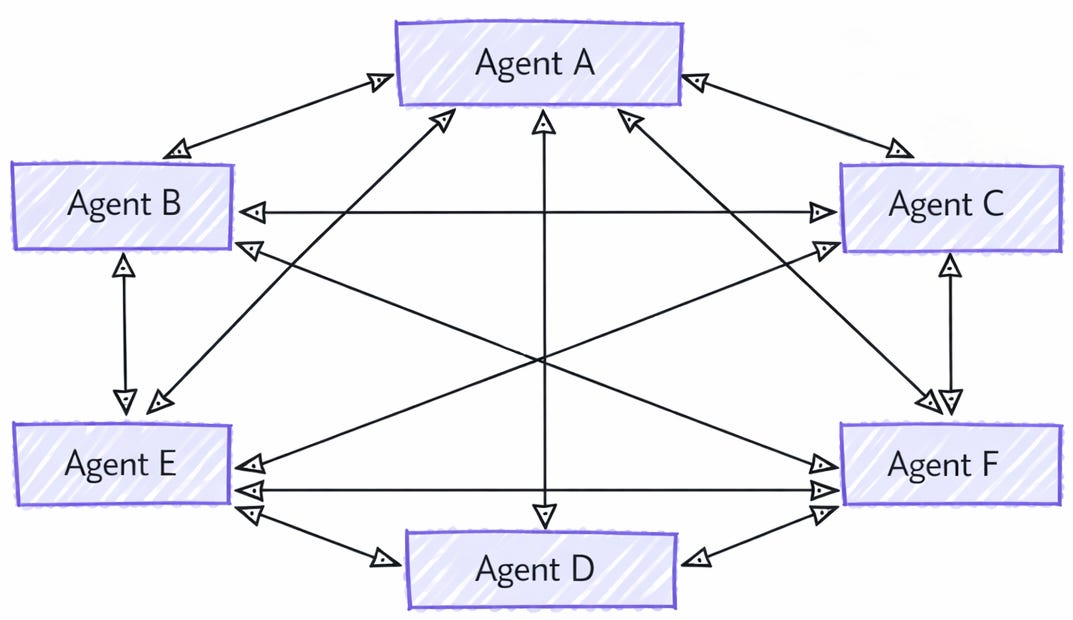
Internally, the handoff orchestration is implemented using a mesh topology where agents are connected directly without an orchestrator. Each agent can decide when to hand off the conversation based on predefined rules or the content of the messages.
Group chat
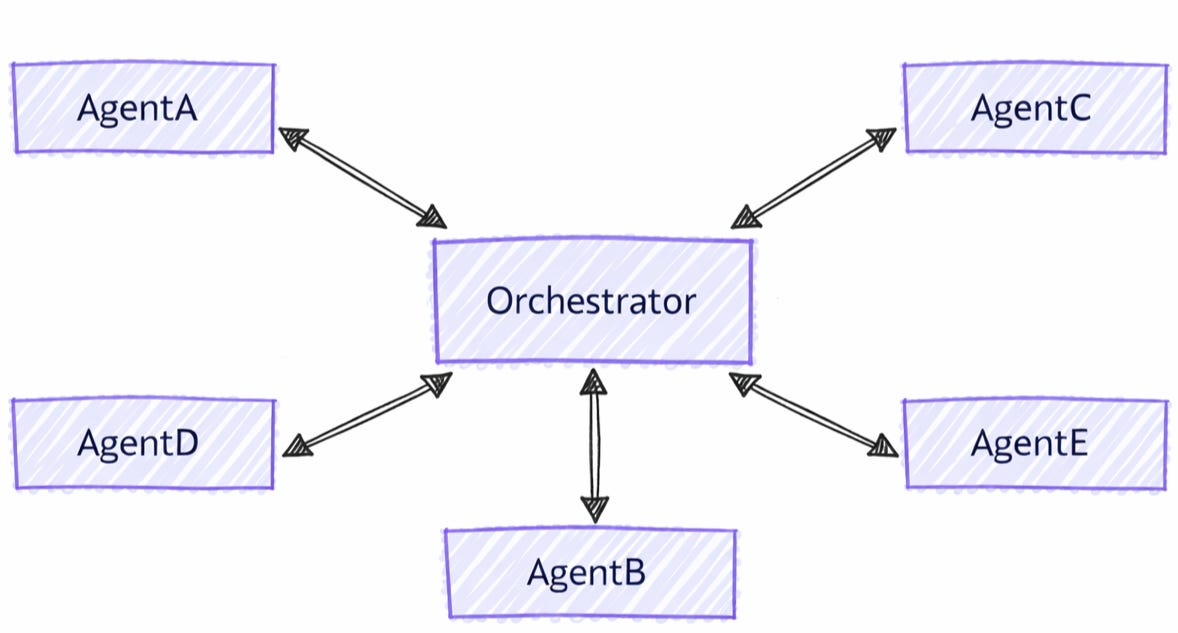
Group chat orchestration models a collaborative conversation among multiple agents, coordinated by an orchestrator that determines speaker selection and conversation flow. This pattern is ideal for scenarios requiring iterative refinement, collaborative problem-solving, or multi-perspective analysis.
Internally, the group chat orchestration assembles agents in a star topology, with an orchestrator in the middle. The orchestrator can implement various strategies for selecting which agent speaks next, such as round-robin, prompt-based selection, or custom logic based on conversation context, making it a flexible and powerful pattern for multi-agent collaboration.
Magentic
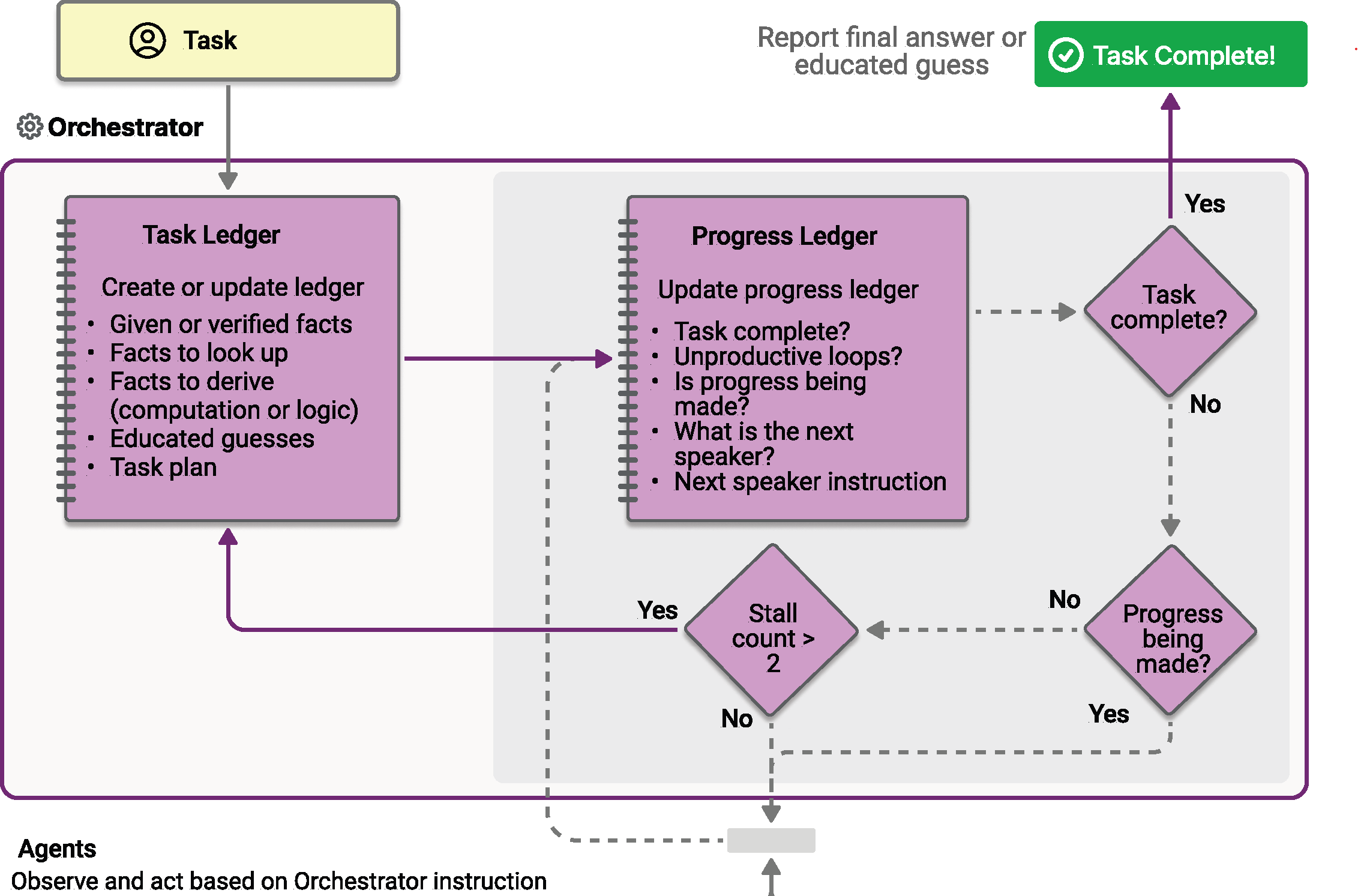
Magentic orchestration is designed based on the Magentic-One system invented by AutoGen. It is a flexible, general-purpose multi-agent pattern designed for complex, open-ended tasks that require dynamic collaboration. In this pattern, a dedicated Magentic manager coordinates a team of specialized agents, selecting which agent should act next based on the evolving context, task progress, and agent capabilities.
The Magentic manager maintains a shared context, tracks progress, and adapts the workflow in real time. This enables the system to break down complex problems, delegate subtasks, and iteratively refine solutions through agent collaboration. The orchestration is especially well-suited for scenarios where the solution path is not known in advance and might require multiple rounds of reasoning, research, and computation.
As always, you can find the code for the solutions I’ve shown in this article on my repository on Github.
Production Ready Features
Microsoft Agent Framework ships with a lot many good tools that makes it easy to ensure that the agents and workflows that you build using the same work reliably in a production setting. Agent Framework integrates with OpenTelemetry, and more specifically Agent Framework emits traces, logs, and metrics according to the OpenTelemetry GenAI Semantic Conventions.
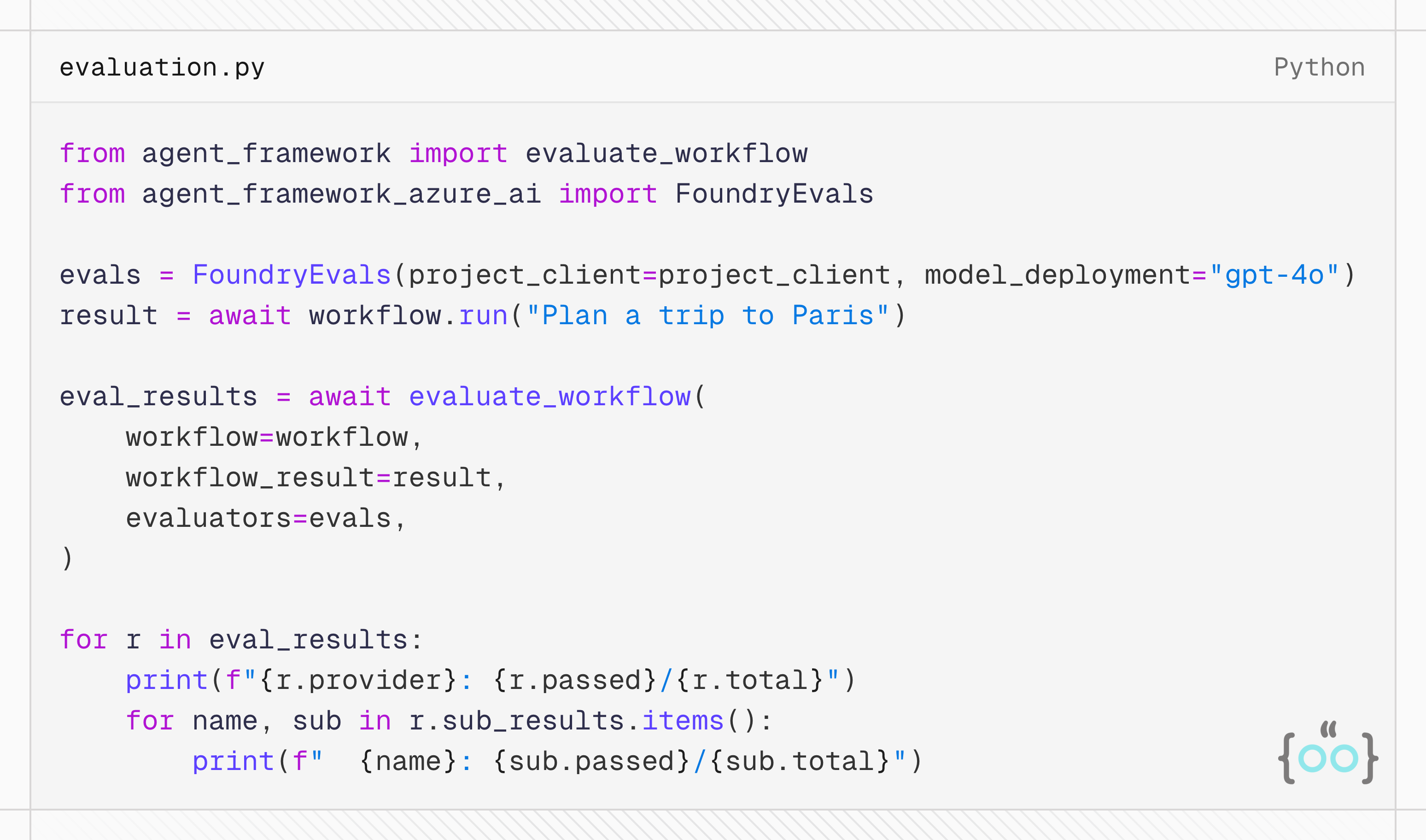
Regarding Evaluations, Agent Framework includes a built-in evaluation framework that lets you measure agent quality, safety, and correctness. You can run fast local checks during development, use Azure AI Foundry's cloud-based evaluators for production-grade assessment, or combine both in a single evaluation run. The eval framework is provider agnostic and is fairly easy to integrate in your CI/CD pipelines with no to minimal code required. You have local evaluators that can check for things like
Response containing a specific keyword
Whether the agent called a specific tool
Whether all the expected tools were called
Whether the right input arguments were provided against the right functions
You can also build your custom executors for checks that you’d like to implement as part of your evals. If you plug in Azure AI Foundry evals, you can run relevance, coherence, and task adherence evaluators and the results would be available on your AI foundry dashboards. You’re not limited to running evals on individual agents, you can run evals on the workflows as well. And the implementation generally is as simple as the code shown below.
I had an incredible time playing around building agents with Microsoft Agent Framework. I was able to get a workflow with three agents up and running in very little time. I hope you enjoyed reading this post and learned something new through this article. I’ll be writing more frequently in the coming weeks and months, and if you find my articles useful, consider subscribing to the blog and sharing it with people who may find it useful. Thank you so much for reading! See you again, very soon.